The 5 Best High Refresh Rate Gaming Monitors: 240Hz to 600Hz
Five high refresh rate gaming monitors compared on official specs: ASUS ROG Swift PG27UCDM 4K 240Hz, Alienware AW2725DF 360Hz, LG UltraGear 27GX790A 480Hz, Samsung Odyssey OLED G6 500Hz and BenQ ZOWIE XL2586X+ 600Hz, with ports, HDR and burn-in warranties.
We may earn a commission when you buy through links on this page. Learn more
Quick answer
The ASUS ROG Swift OLED PG27UCDM ($1,099) is the best high refresh rate gaming monitor for most people: a 27-inch 4K QD-OLED at 240Hz with DisplayPort 2.1 UHBR20 and a 3-year burn-in warranty. The Alienware AW2725DF ($649.99) is the best value at 1440p 360Hz, the LG UltraGear 27GX790A (480Hz) and Samsung Odyssey OLED G6 (500Hz) are the fastest OLEDs, and the BenQ ZOWIE XL2586X+ ($999.99) hits 600Hz for esports.
Refresh rate is how many times per second a monitor draws a new image. A standard monitor runs at 60Hz; these run from 240Hz to 600Hz, which makes fast motion look sharper and smoother and lets you see and react to what's happening sooner, provided your PC can produce the frames.
I picked five monitors from five brands to cover every kind of high-refresh gamer: a 4K OLED for gorgeous single-player games, three 1440p OLEDs from 360Hz to 500Hz, and a 600Hz esports monitor. Four of the five are OLED, which switches pixels almost instantly; every OLED here is rated at 0.03ms response time.
Every price and spec comes from each maker's official US product page as of November 2026. These are research-based picks with no star scores. Building a setup? See our best PS5 accessories and best routers for gigabit internet guides.
Our picks at a glance
1. Best overall
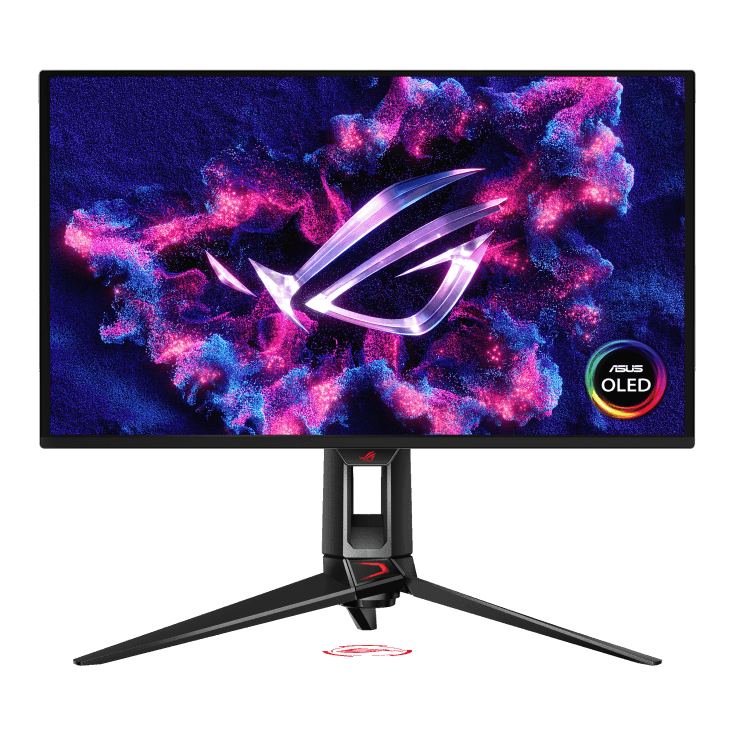
ASUS ROG Swift OLED PG27UCDM
The PG27UCDM combines everything: 4K sharpness, a 240Hz refresh rate and OLED contrast. ASUS uses a fourth-generation Tandem QD-OLED panel, with a 0.03ms response time, DisplayHDR 400 True Black certification, Dolby Vision and up to 1,000 nits peak brightness.
It's the best-connected monitor here. Its DisplayPort 2.1a UHBR20 port runs at 80Gbps, which ASUS says carries 4K at 240Hz uncompressed, and it adds two HDMI 2.1 ports for consoles and a USB-C port with DisplayPort Alt Mode and 90W charging, so a laptop can connect with one cable.
ASUS covers burn-in under its three-year warranty and adds OLED Care Pro features: Pixel Cleaning, Screen Move and a Neo Proximity Sensor that switches to a black screen when you walk away. The stand adjusts for height, swivel, pivot and tilt. You'll need a powerful GPU to run games at 4K 240Hz, but even at lower frame rates, the image quality is the draw.
Pros
- 014K at 240Hz
- 02DP 2.1 UHBR20 for uncompressed 4K 240Hz
- 03USB-C with 90W charging
- 043-year burn-in warranty
Cons
- 01$1,099
- 024K 240Hz needs a high-end GPU
| Panel | 27" 4th-gen Tandem QD-OLED |
|---|---|
| Resolution / refresh | 4K (3840×2160), 240Hz |
| Response | 0.03ms GtG |
| HDR | DisplayHDR 400 True Black, Dolby Vision |
| Ports | DP 2.1a UHBR20, 2× HDMI 2.1, USB-C 90W |
| VRR | FreeSync Premium Pro, G-Sync Compatible |
| Warranty | 3 years, incl. burn-in |
2. Best value
Alienware 27 360Hz QD-OLED (AW2725DF)
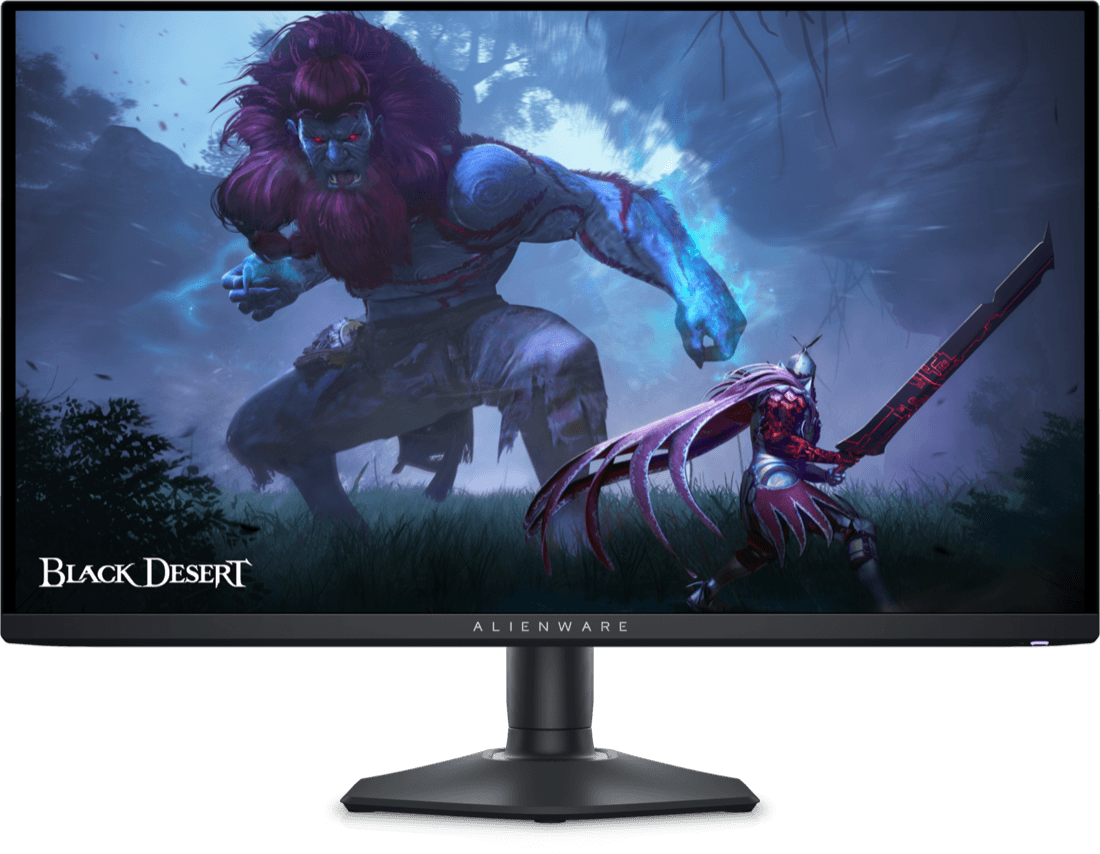
The AW2725DF is the most affordable OLED here at $649.99, and it doesn't skimp. It's a 27-inch 1440p QD-OLED at 360Hz with a 0.03ms response time, DisplayHDR True Black 400 and up to 1,000 nits peak brightness, plus 99.3% DCI-P3 color.
At 1440p, 360Hz is far more achievable for most PCs than 4K at 240Hz, which makes this a great match for competitive shooters as well as single-player games. You connect it at 360Hz over its DisplayPort 1.4 ports; note that Dell says its HDMI 2.1 port is limited to 1440p at 144Hz, so it's less ideal for consoles that use HDMI.
Dell's three-year Advanced Exchange Service and Premium Panel Exchange include coverage for OLED burn-in. The stand adjusts for height, tilt, swivel and pivot. If you want 4K, Dell's Alienware AW2725Q is $899.99, with 4K at 240Hz over HDMI 2.1 and Dolby Vision.
Pros
- 01Lowest price at $649.99
- 021440p 360Hz QD-OLED
- 033-year warranty incl. burn-in
- 04Fully adjustable stand
Cons
- 01HDMI limited to 144Hz
- 02No DisplayPort 2.1
| Panel | 27" QD-OLED |
|---|---|
| Resolution / refresh | 1440p, 360Hz |
| Response | 0.03ms GtG |
| HDR | DisplayHDR True Black 400 |
| Ports | 2× DP 1.4, HDMI 2.1, USB-C, 3× USB-A |
| VRR | FreeSync Premium Pro |
| Warranty | 3 years, incl. OLED burn-in |
3. Fastest QD-OLED
Samsung Odyssey OLED G6 G60SF (LS27FG602SNXZA)
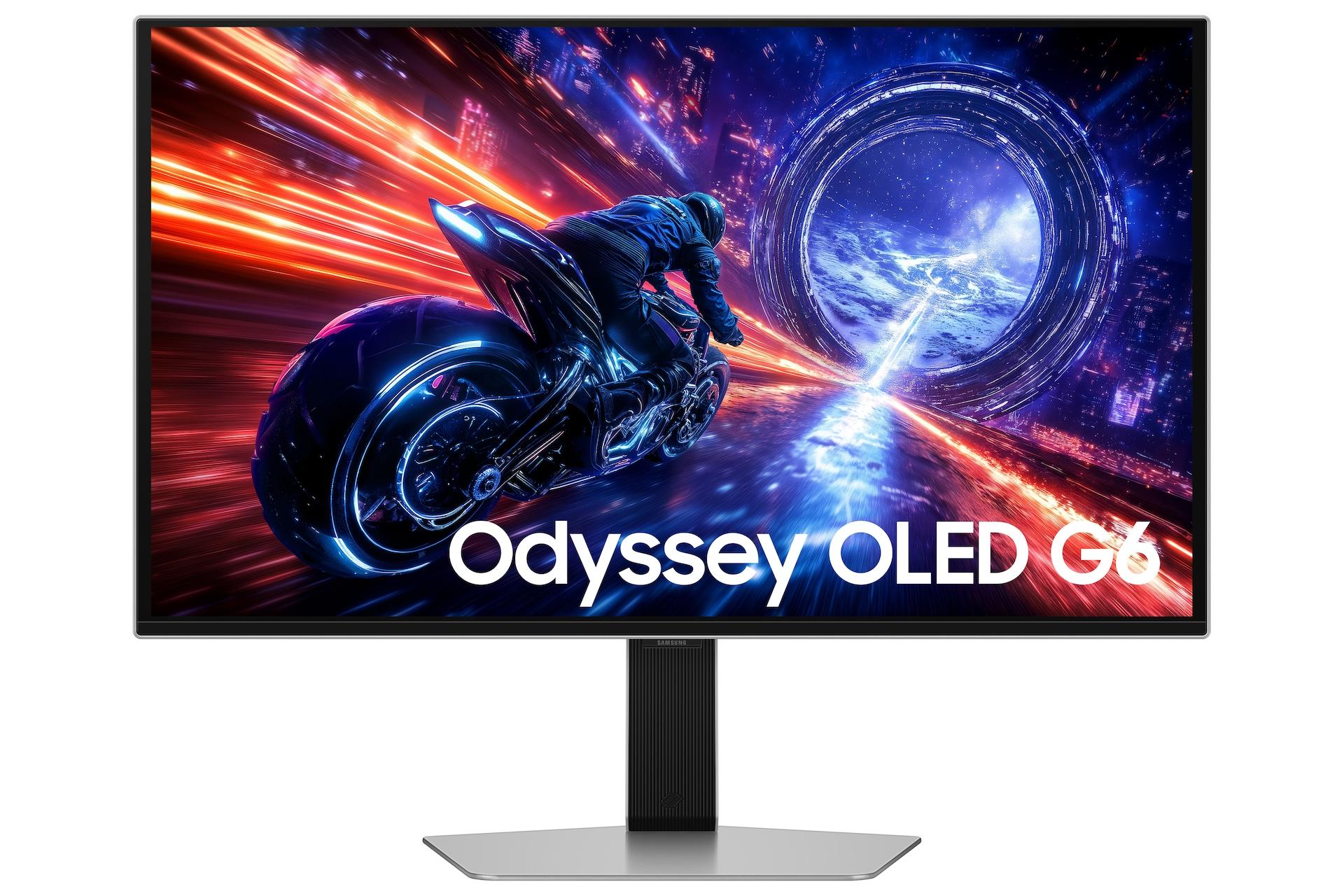
Samsung says the Odyssey OLED G6 is the world's first 500Hz OLED monitor. It's a 27-inch 1440p QD-OLED with a 0.03ms response time and Samsung's Glare Free finish, which helps in bright rooms.
It also has the best HDR certification here: VESA DisplayHDR True Black 500, plus HDR10+ Gaming. It supports FreeSync Premium Pro and G-Sync Compatible, and connects over one DisplayPort 1.4 and two HDMI 2.1 ports, with two USB-A ports but no USB-C.
The stand offers 120mm of height adjustment, swivel and pivot. Samsung's OLED Safeguard+ is its burn-in protection system. At $999.99, it's priced alongside LG's 480Hz model. If you'd rather have 4K, Samsung's Odyssey OLED G8 G80SH 4K 240Hz was on sale for $799.99, down from $1,099.99, valid until November 11.
Pros
- 01500Hz OLED
- 02DisplayHDR True Black 500
- 03Glare Free finish
- 04FreeSync Premium Pro and G-Sync Compatible
Cons
- 01No USB-C
- 02DP 1.4 rather than 2.1
| Panel | 27" QD-OLED, Glare Free |
|---|---|
| Resolution / refresh | 1440p, 500Hz |
| Response | 0.03ms |
| HDR | DisplayHDR True Black 500, HDR10+ Gaming |
| Ports | DP 1.4, 2× HDMI 2.1, 2× USB-A |
| VRR | FreeSync Premium Pro, G-Sync Compatible |
| Burn-in care | OLED Safeguard+ |
4. Best 480Hz OLED
LG UltraGear OLED 27GX790A-B
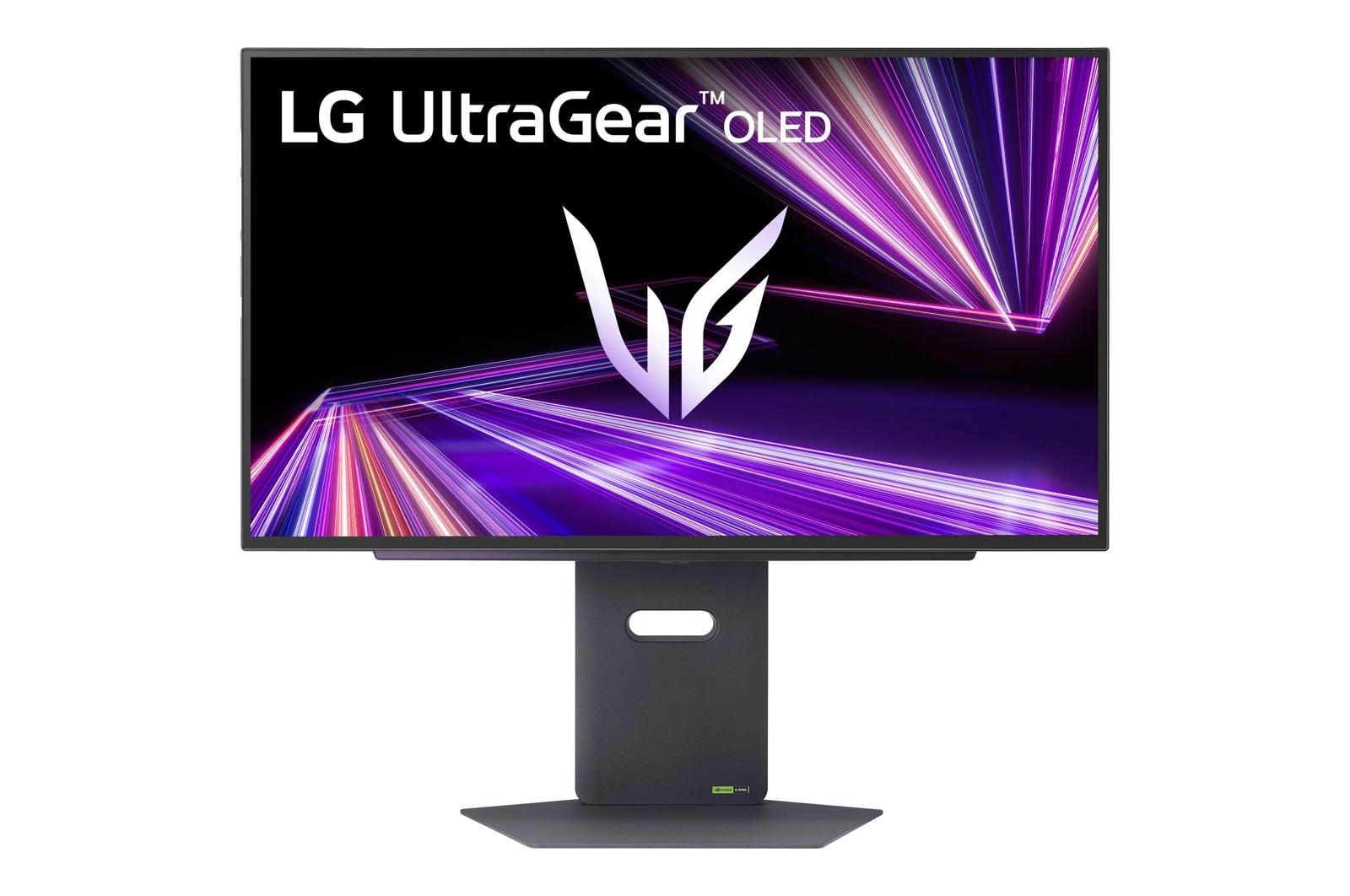
LG's UltraGear 27GX790A is a 27-inch 1440p OLED at 480Hz, with a 0.03ms response time and a peak brightness LG lists at 1,300 nits at 1.5% APL. It's certified DisplayHDR True Black 400 and VESA ClearMR 21000 for motion clarity, with 98.5% DCI-P3 color.
There's one important requirement: LG says you need a DisplayPort 2.1 graphics card to reach 480Hz. Over DisplayPort 1.4 or HDMI 2.1, it tops out at 240Hz. It has one DisplayPort 2.1 port, two HDMI 2.1 ports and a USB 3.0 hub, but no USB-C.
LG's two-year limited warranty covers key components, including the OLED panel, and its OLED Care tools include pixel cleaning. The stand adjusts for height, swivel, tilt and pivot. It's listed at $999.99, but LG showed it as out of stock when I checked.
Pros
- 01480Hz OLED
- 021,300 nits peak brightness
- 03DisplayPort 2.1
- 04ClearMR 21000 motion clarity
Cons
- 01480Hz needs a DP 2.1 GPU
- 02Out of stock when checked
- 032-year warranty
| Panel | 27" OLED |
|---|---|
| Resolution / refresh | 1440p, 480Hz |
| Response | 0.03ms GtG |
| HDR | DisplayHDR True Black 400, 1,300 nits peak |
| Ports | DP 2.1, 2× HDMI 2.1, USB 3.0 hub |
| VRR | FreeSync Premium Pro, G-Sync Compatible |
| Warranty | 2 years, incl. OLED panel |
5. Best for esports
BenQ ZOWIE XL2586X+
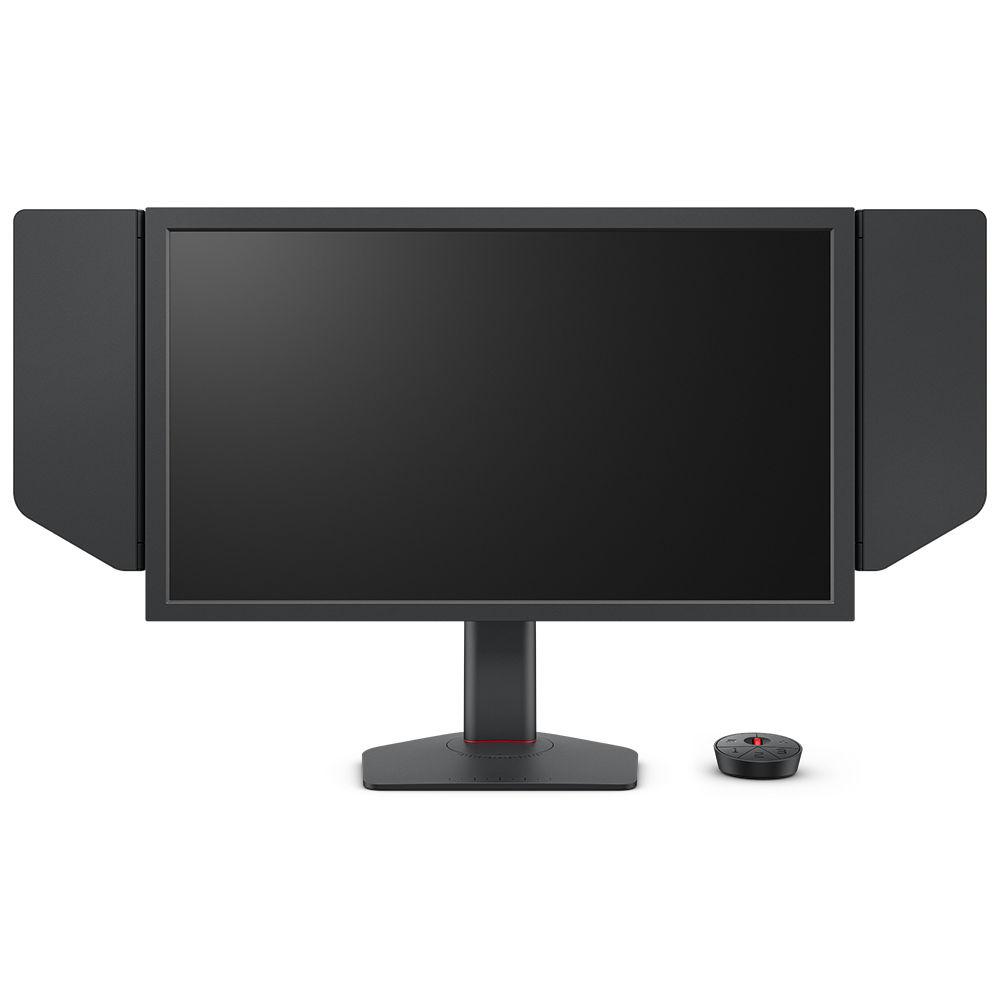
The XL2586X+ is built for one thing: competitive shooters. BenQ's ZOWIE brand pushes it to 600Hz at 1080p on a 24.1-inch Fast TN panel, the highest refresh rate here, with its DyAc 2 motion-blur reduction.
It's a different kind of monitor from the OLEDs. TN panels don't match OLED's contrast or color, and BenQ lists 320 nits and 1000:1 contrast, but for esports players, motion clarity and a smaller screen you can take in at a glance matter most. It includes an S Switch control puck and side shields to block distractions.
BenQ is clear about what 600Hz takes: Windows 11 updated to a build from November 1, 2023 or later, since older builds cap at 500Hz, and it recommends an NVIDIA RTX 40 or AMD RX 7000 series GPU with a recent CPU. It connects over HDMI 2.1 or DisplayPort 1.4, and consoles run at 1080p 120Hz.
Pros
- 01600Hz, the fastest here
- 02DyAc 2 motion clarity
- 03S Switch and side shields
- 04Tall 155 mm height range
Cons
- 01TN panel: less contrast and color than OLED
- 021080p only
- 03Needs a powerful PC
| Panel | 24.1" Fast TN |
|---|---|
| Resolution / refresh | 1080p, 600Hz |
| Motion | DyAc 2 blur reduction |
| Brightness | 320 nits, 1000:1 contrast |
| Ports | 3× HDMI 2.1, DP 1.4 |
| Stand | 155 mm height, tilt, swivel |
| Extras | S Switch, side shields |
How much refresh rate do you need?
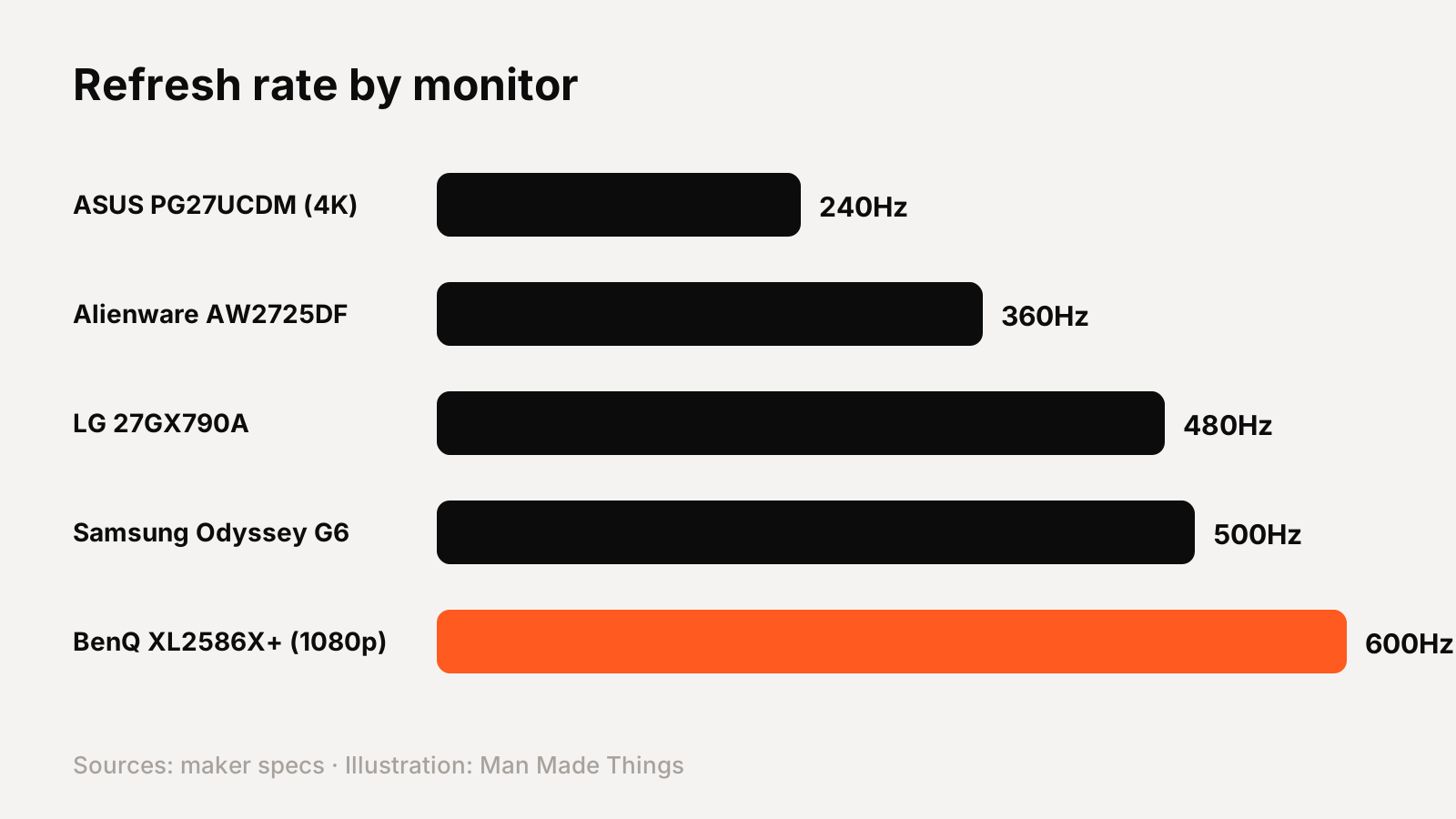
A higher refresh rate only helps if your PC can produce that many frames per second. Here's how the picks line up:
- 240Hz at 4K (ASUS PG27UCDM): the best image quality, but 4K at 240fps needs a top-end GPU in most games.
- 360Hz at 1440p (Alienware AW2725DF): the sweet spot for many PCs, fast enough for competitive shooters.
- 480Hz (LG 27GX790A) and 500Hz (Samsung G6): for players who already hit very high frame rates. LG says 480Hz needs a DisplayPort 2.1 graphics card.
- 600Hz at 1080p (BenQ XL2586X+): pure esports. BenQ recommends an RTX 40 or RX 7000 series GPU and an updated Windows 11.
If you mostly play story-driven games, resolution and HDR matter more than going past 240Hz. If you play competitive shooters at high frame rates, the 360Hz to 600Hz monitors make more sense.
Ports and cables matter at high refresh rates
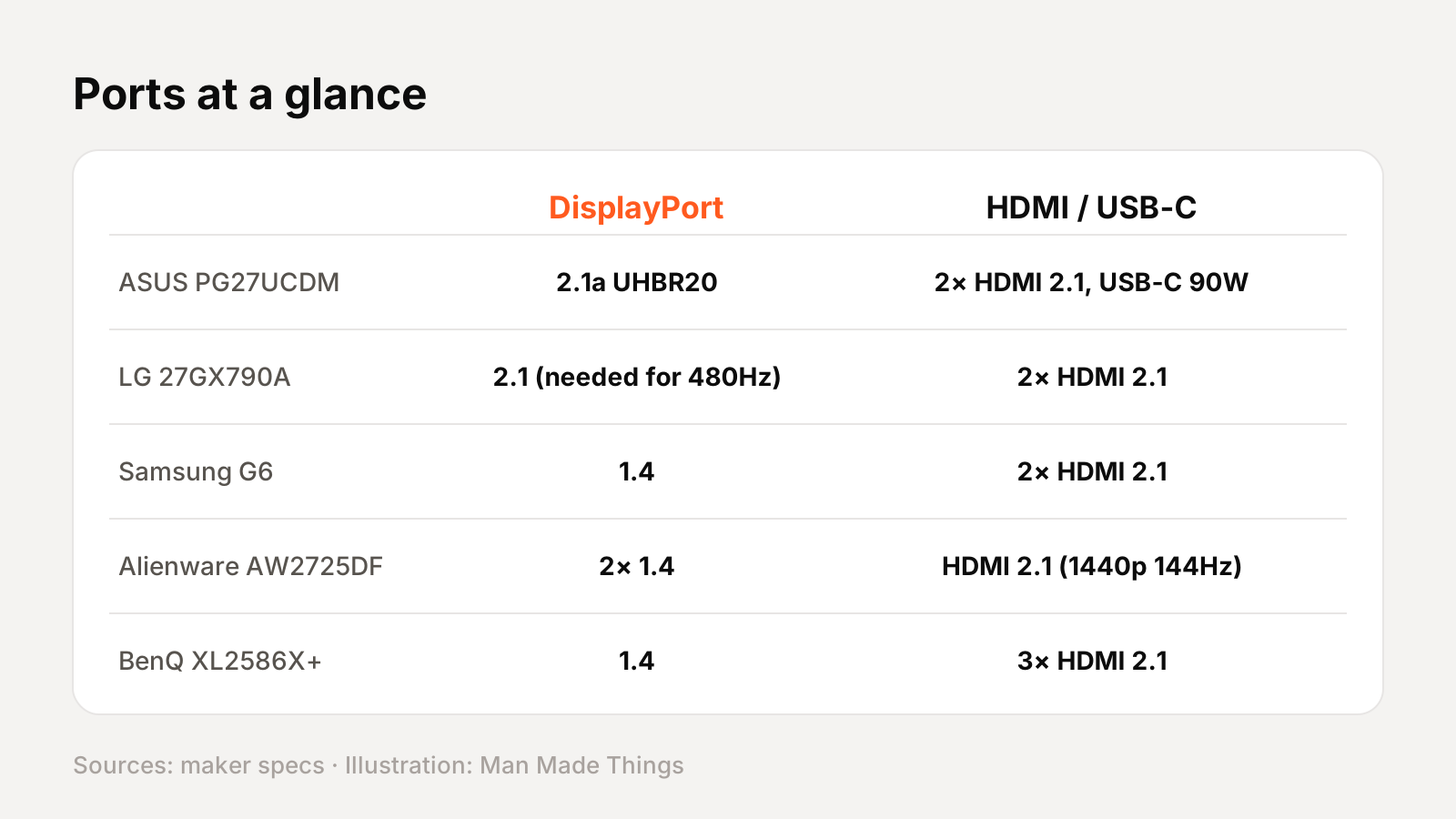
At these speeds, the port you use can limit your refresh rate.
- DisplayPort 2.1: ASUS's UHBR20 port runs at 80Gbps, which ASUS says carries 4K at 240Hz uncompressed. LG requires DP 2.1 for 480Hz.
- DisplayPort 1.4: used by Alienware for 360Hz and Samsung for its G6.
- HDMI 2.1: important for consoles. ASUS, LG, Samsung and BenQ have HDMI 2.1 ports; Alienware's HDMI is limited to 1440p at 144Hz.
- USB-C: only the ASUS has USB-C with 90W charging among these picks, ideal if you also connect a laptop.
Check that your graphics card has the right output, and use the cable that comes with the monitor. For PlayStation or Xbox, choose a monitor whose HDMI 2.1 supports the refresh rate you want.
OLED burn-in: how to protect your monitor
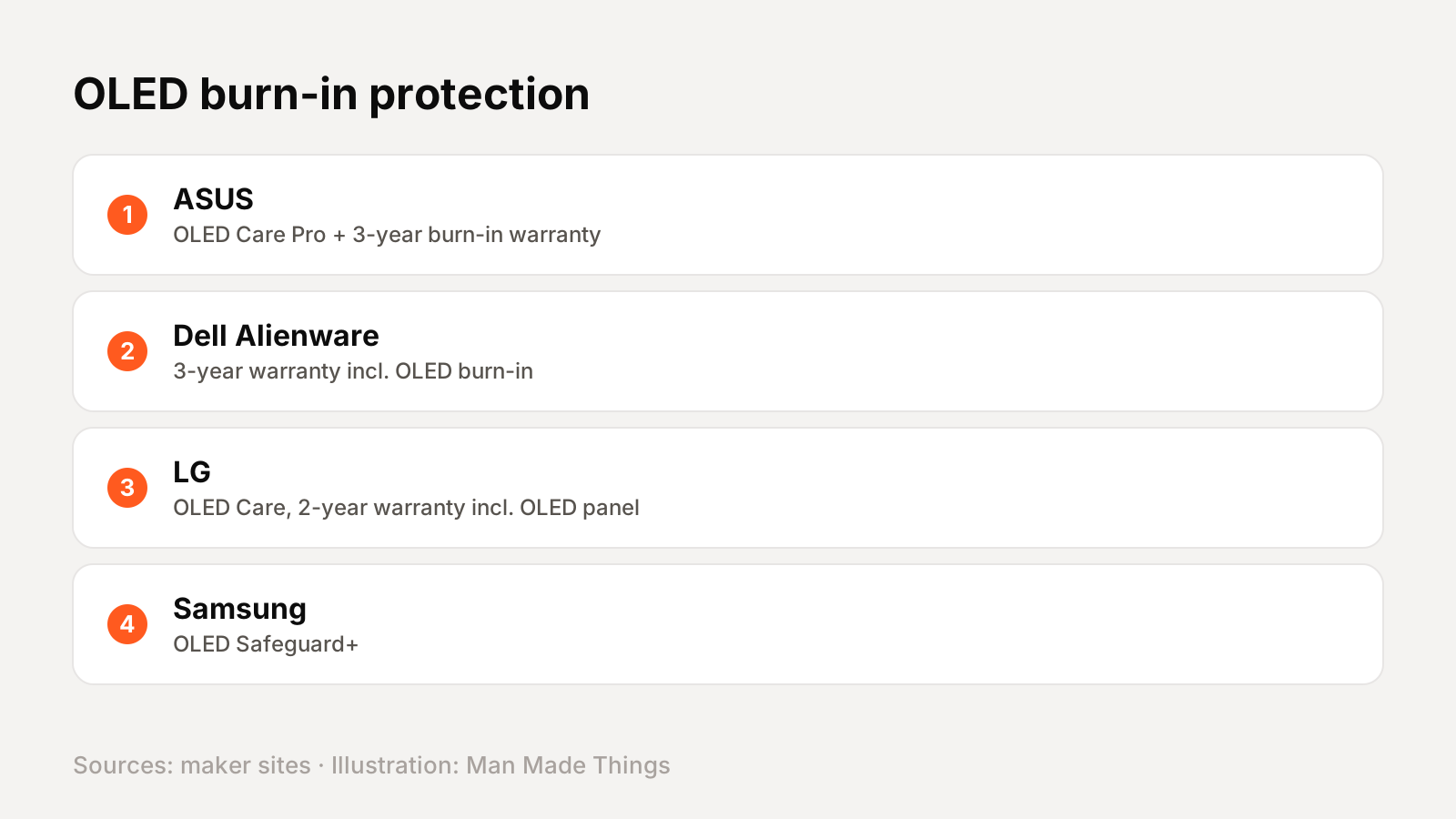
OLED monitors can suffer burn-in, where static images like a game's HUD leave a faint mark over time. Every brand here builds in protection:
- ASUS OLED Care Pro: Pixel Cleaning, Screen Move and a proximity sensor that blacks out the screen when you leave. ASUS's 3-year warranty covers burn-in.
- Dell Alienware: a 3-year warranty that includes OLED burn-in coverage; Dell says its 4K AW2725Q also uses an anti-burn-in algorithm and a graphite sheet.
- LG: OLED Care tools including pixel cleaning, with a 2-year warranty that covers the OLED panel.
- Samsung: OLED Safeguard+ protection.
Let the monitor run its pixel-cleaning cycle when it prompts you. If you play the same game with a static HUD for hours every day and worry about burn-in, a warranty that names burn-in coverage, like ASUS's or Dell's, gives the most peace of mind.
Frequently asked questions
What is the best high refresh rate gaming monitor?
+
For most people, the ASUS ROG Swift OLED PG27UCDM ($1,099): 4K QD-OLED at 240Hz with DisplayPort 2.1 UHBR20 and a 3-year burn-in warranty.
Which monitor has the highest refresh rate?
+
The BenQ ZOWIE XL2586X+ at 600Hz (1080p). Among OLEDs, the Samsung Odyssey OLED G6 reaches 500Hz.
Do I need DisplayPort 2.1?
+
For some monitors. LG says the 27GX790A needs a DP 2.1 graphics card for 480Hz; over DP 1.4 or HDMI 2.1 it tops out at 240Hz.
Do OLED gaming monitors get burn-in?
+
It's possible, so brands include protection. ASUS and Dell include burn-in coverage in 3-year warranties.
Sources
Editor-in-Chief
Rahul has been writing about gadgets and software since 2013, first at Thetechhacker and now at Man Made Things. He edits every review on the site and signs off on every verdict.
More from Rahul →
